1 yearLudus turns one — and version 1.8 is out.

Join the official Discord
Changelog

Release notes.
What changed.

New features and fixes, from the latest release to the first beta.

v1.8.2November 4, 2026

A new home for Ludus

A small release that moves Ludus to its new address, ludus1.netlify.app.

Find sourcesThe Find sources button on the Sources page now opens ludus1.netlify.app/sources.
UpdatesLudus now checks for updates on the new site, so future releases keep reaching you.
Install 1.8.2 Ludus on Windows offers the update by itself, or download the installer from the home page. Linux gets the same release as an AppImage and a .deb package.
v1.8.1October 29, 2026

Downloads that don't stall

A fix release for downloads that stalled or never started, the Retro section downloading the wrong game, and the Corrections page. Ludus also stops shipping download sources.

Sources are yours to chooseLudus no longer comes with sources pre-installed, and SubSource has been removed. Ludus is the launcher: you add the sources you trust on the Sources page by pasting their .json link. This keeps Ludus a neutral tool that doesn't distribute any content itself. Sources you added yourself stay as they were.
Torrents stay fastDownloads keep running on the Swarm engine. If it is slow to start or stops responding, Ludus restarts it and resumes where it was, instead of switching to the slower Anchor engine, which could sit at 0%. In our test, a 3.4 GB torrent finished in 3 minutes 35 seconds at full line speed, with the engine killed halfway through. The engine now starts with the app, so it is ready when you click Install.
No more incomplete gamesA download only finishes when every byte is on disk. A rounding bug could mark 99.96% as done and send the game to the installer with pieces missing.
Clearer messagesWhen Ludus has to use another engine, the download card says why. If your network blocks Gofile, Ludus tells you in seconds and suggests another source, instead of sitting on “Starting”.
Kinder to home routersFewer connection bursts, with the same speed.
RetroYou get the game you asked for: Super Mario World no longer downloads God of War. The file name is checked before anything is saved, and the PS1 and Wii folders are fixed.
Corrections pageIt opens again. In 1.8.0 it showed a single error line on a black page.
Download panelThe start button no longer covers the last engine option.
Install 1.8.1 Ludus on Windows offers the update by itself, or download the installer from the home page. Linux gets the same release as an AppImage and a .deb package.
v1.8October 25, 2026

One year of Ludus

Ludus turns one, and 1.8 is the biggest update since the first beta. It brings a community inside the launcher, Ludus Points and a new profile store, a redesigned theme creator, installable extensions, faster downloads, a new look and a new intro.

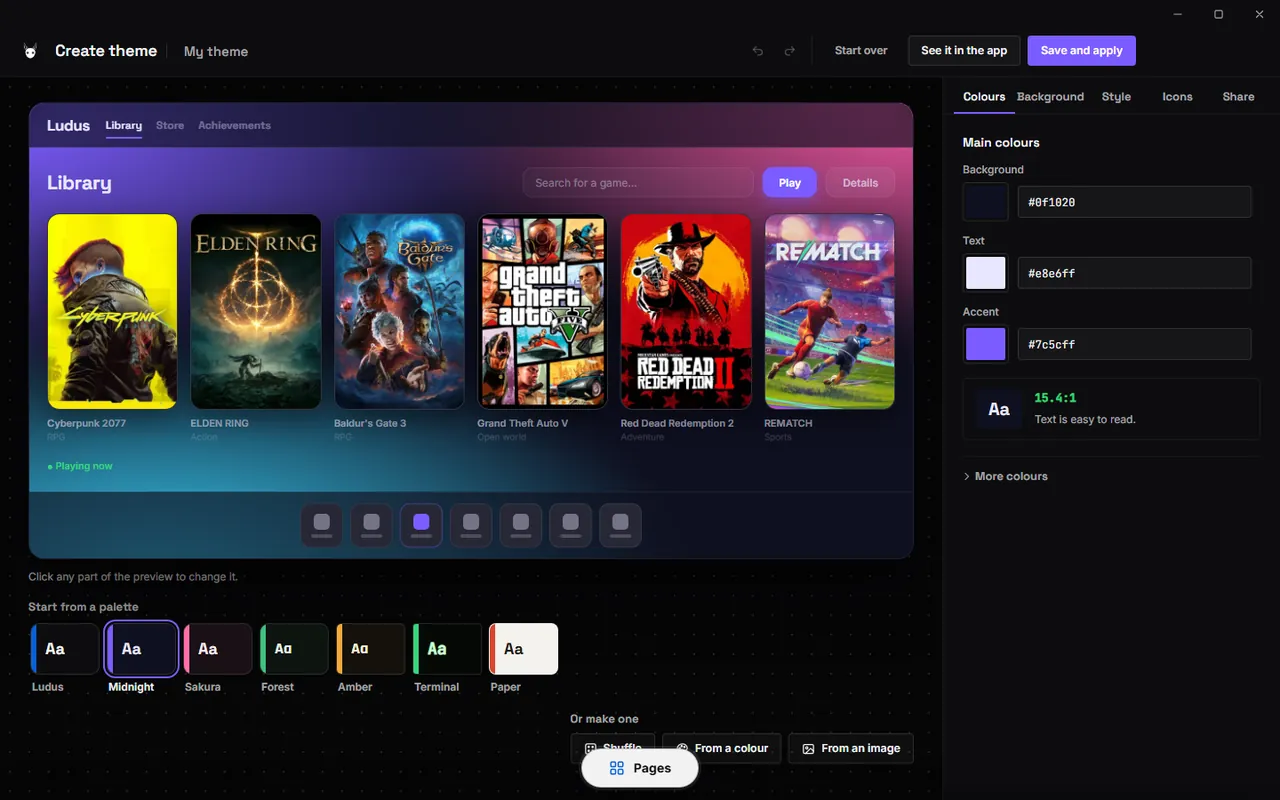
The redesigned Ludus theme creator with a large live preview
The new theme creator: a big live preview and palettes from a colour or an image.
CommunityA feed of posts and reviews, player rankings, player search and game activity. Review games and sources, and show what you're playing right now.
Ludus PointsEarn points for time in Ludus, finished downloads, completed games, community posts and daily visits. Everyone starts with 100 welcome points; your balance is shown at the top of every page and new points wait for you to claim them.
Profile store80 new items: CC0 photos, animated loops and light effects, 27 animated character frames, avatar frames with a rotating light ring and glowing titles. A home page, category mosaic, shelves and type filter. Items you buy stay on your account on any device.
Theme creatorA new layout with a large live preview and tabs for colours, background, style, icons and sharing. Click any part of the preview to change it, undo and redo, random palettes, palettes from one colour or an image, and alert colours with a preview. Themes now paint the whole page; the Ludus logo and name stay as they are.
Accent coloursA new “From theme” option makes the accent follow your theme. The accent works on top of any theme, with a live preview of cards, downloads and switches.
ExtensionsTurn on what you want: FPS overlay, custom keyboard shortcuts, a command palette, download-finished alerts, in-game download progress, automatic save backups and game collections.
Faster downloadsTorrents run in a separate libtorrent process and the Swarm engine is recommended for magnets. Files are allocated sparsely, aria2 looks for new peers when speed drops below 10 MB/s, Turbo handles more hosts, and a new “Ready to play” engine installs the game when the download ends.
Steam integrationBetterSteamTools detects the Steam folder, syncs automatically and applies manifests without restarting Steam.
New look and introA new intro video made in motion design, a renewed theme picker with keyboard controls, more consistent spacing and colours, and the Back buttons removed from page headers.
Accounts and securitySign in with Discord or continue as a guest; the password section has been removed from Settings. The installed app is more locked down and translations have been improved.

Install 1.8 Ludus on Windows offers the update by itself, or download the installer from the home page. Existing accounts and libraries are preserved. Linux gets the same release as an AppImage and a .deb package.
v1.7.2October 11, 2026

1.7 Refinement

Bug fixes, smoother navigation and a refreshed store. This maintenance release improves download handling, language selection and startup on Windows and Linux.

Download enginesImproved torrent discovery with DHT, trackers and peer exchange, clearer startup states and recovery from engine errors. HTTP engines have retry and connection timeout handling. Downloads still depend on available peers and working sources.
A clearer storeRefined featured cards, matching left and right carousel buttons and arrow controls for horizontal game shelves. Artwork is reused from cache to reduce repeated loading.
Pages menuA more visible Pages button opens on hover and contracts above the menu. Click and keyboard controls remain available.
Portuguese or EnglishChoose the language before the terms on first launch, and change it later in Settings. The interface, prompts, tray menu and desktop notifications follow the selected language.
First launchThe introduction video now plays during first-time setup. Fixed the heartbeat audio continuing after leaving the headphones screen.
AccountsDiscord sign-in and guest access, a lighter account selector and a corrected three-dot menu. Discord sign-in is requested again after 48 hours without using Ludus.
Find sourcesA new Find sources button opens the source catalogue on the Ludus website.
Startup and securityImproved instance handling and checks that the launcher connects to its own backend. Local APIs require a launch token; remote frames cannot use privileged Electron actions. Updated vulnerable dependencies and retained archive path and credential protection.
Windows and LinuxWindows x64 installer, Linux x64 AppImage and Debian package. Both builds include aria2 and libtorrent. Linux starts the download daemon correctly and saves preferences outside the packaged application.
Install 1.7 Refinement Download the current installer from the home page. Existing accounts and libraries are preserved; new installations contain no personal data.
v1.7October 1, 2026

A launcher that feels more like yours

Give Ludus a different look, discover Epic titles and keep your progress between sessions. Version 1.7 adds a visual theme creator, improves cloud saves and makes profiles, shortcuts and download choices easier to use.

English throughoutPages, settings, prompts, desktop notifications and the tray menu now use English, including when older language preferences are saved.
A direct route to sourcesThe Sources page in the app links to the website's source directory. Copy a JSON link and paste it into Ludus to add it.
Fresh installation packagesWindows gets an installer; Linux x64 gets AppImage and .deb packages for systems with glibc 2.39+. New installations include no accounts, games or personal settings.

A new look, without writing a theme file

Start with three colours and use the visual creator to fine-tune the rest. You can try a different look before committing to it, keep it for yourself or share it with other players.

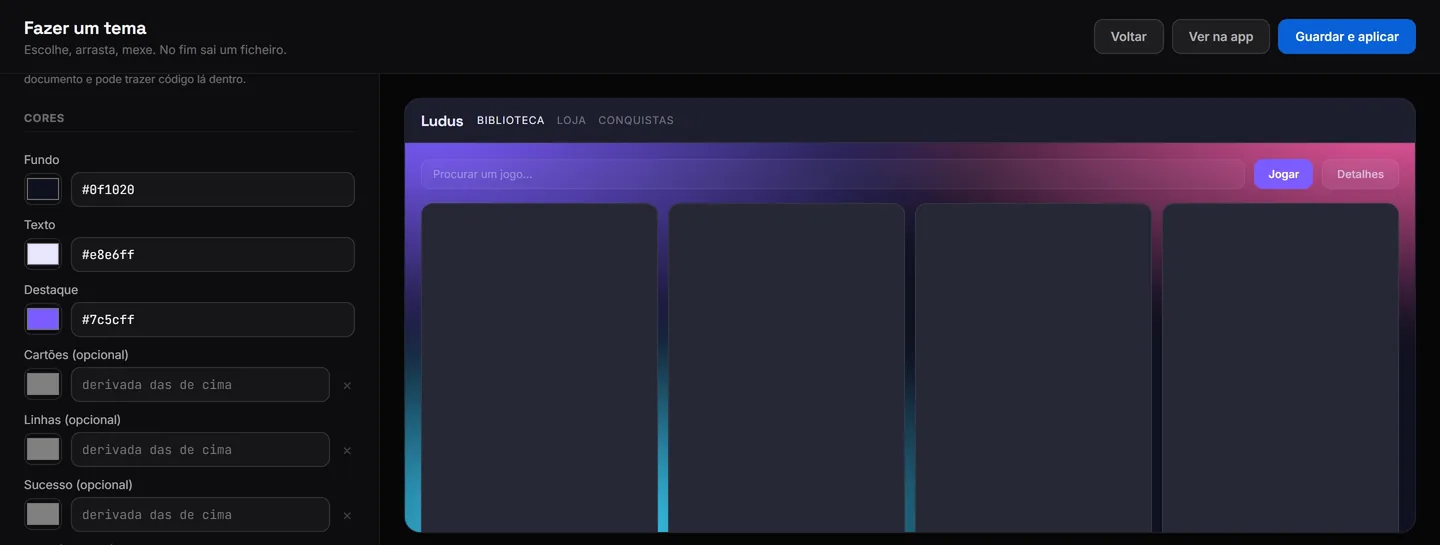
Colour controls and a live theme preview in the Ludus visual editor
The theme creator shows your choices as you edit.
Visual theme creatorSet background, text and accent colours with colour pickers. Optional controls let you adjust individual surfaces and status colours.
More than coloursChoose fonts, text size, rounded corners and layout density. Themes can also include a logo, icons and a background.
Preview before applyingSee the theme on a sample layout while you edit, then save and apply it when you're happy with the result.
Export and shareDownload the theme file or publish it through a connected GitHub account. You can keep your theme repository separate from cloud saves.
Theme storeBrowse community themes with ratings and install counts. Keep a favourite look or try another one.
Backgrounds to suit your themeChoose a plain colour, a gradient or an animated colour effect. You can also use an image for the background.

Better handling for your progress

Connect cloud saves to back up supported games after a session. Save detection covers more common folders, and larger backups have more room.

Backup after playingWhen cloud saves are connected, Ludus watches for a game closing before backing up its saves.
Up to 25 MB per gameThe limit applies to the compressed save archive. If it exceeds the limit, Ludus explains why the backup couldn't be uploaded.
More save locationsDetection includes Windows Saved Games and other common locations. A custom folder can be selected when automatic detection doesn't find the right files.
Restore on another computerUse the same connected cloud account to restore a supported game's backup. Cloud saves need to be configured on that computer too.
Try cloud saves: connect your account on the Cloud Saves page, select a supported game and check its save folder. Once configured, Ludus can back up your progress after you finish playing.

More to browse, clearer downloads

Find more games in the same catalogue, browse their details and choose how to download them. Cover images you've already seen are reused as you search, so there's less repeated loading.

Epic catalogueEpic titles appear alongside the rest of the catalogue, with artwork, descriptions and trailers where available.
Choose your engineSelect an available download engine before starting. The options depend on the download source and format.
Less repeated loadingStore searches reuse covers already on screen instead of fetching the same artwork again.
Your own icons and artworkChoose a supported public asset collection to give Ludus a different set of icons and images alongside your theme.

Your profile, one click away

Open your profile straight from the store, rotate your profile card and explore the keyboard guide. The current 1.7 build also fixes the guest label that could remain on screen after signing in.

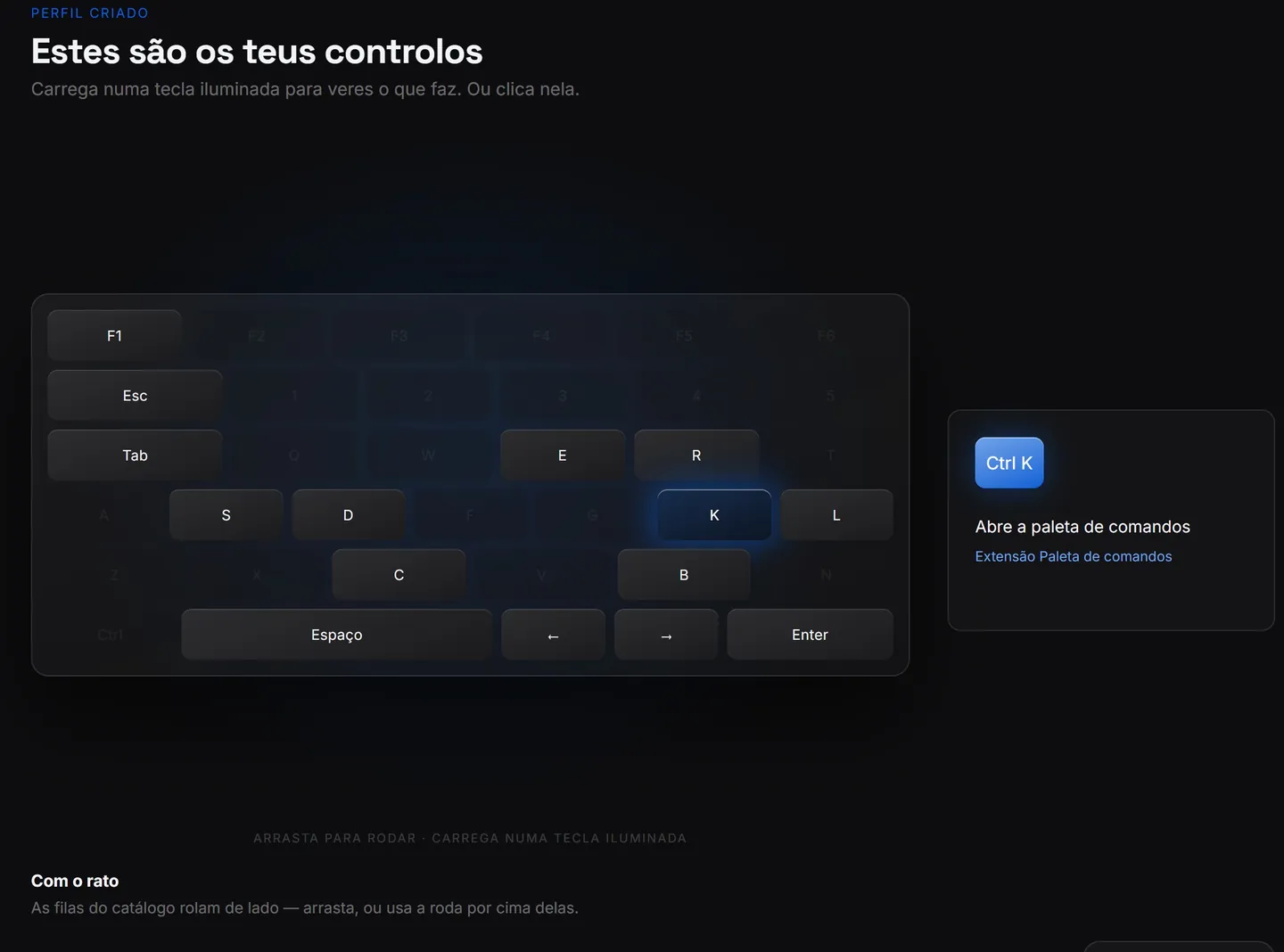
The interactive Ludus keyboard showing the Ctrl K command palette shortcut
Highlighted keys explain the action and where the shortcut works.
Interactive profile cardsRotate your profile card to see it from different angles. The 3D view makes your profile feel more personal.
Learn by trying a shortcutClick a highlighted key or press it on your keyboard to read its action. The guide explains where each shortcut works, so you know when to use it.
Account display fixedThe store's account button uses the signed-in profile instead of leaving a guest label after login.
Direct access to your profileClick your account in the store header to open the profile page.
Start with your own setupNew installations begin with the base settings. Start browsing as a guest, then connect your account and choose a theme when you're ready.

This release also includes maintenance fixes to account handling and startup.

Getting started with 1.7? Install Ludus, choose your settings and connect the accounts you want to use. Themes and cloud saves can be configured when you're ready.
v1.6June 30, 2026

A new design and a store for retro games

Version 1.6 brings a new look to the site and app, reworks the stores and adds a section for retro games. Achievements, Library and Bypass were temporarily removed during this rebuild.

Stores fully workingEvery store section works end to end.
ROMs storeA dedicated store for retro ROMs.
27,000 manifestsCatalogue expanded to ~27,000.
Complete redesignEvery page and screen rebuilt.
Better cloud savesRebuilt for faster, steadier sync.
New download managerImproved download handling with pause/resume and better progress tracking.
Search improvementsBetter search algorithms with filters and sorting.
Temporarily removed: Achievements, Library and Bypass were taken out to support the rebuild and are planned to return.
v1.5 FIXApril 11, 2026

Bug fixes & the Sources page

A focused patch for issues reported after the 1.5 beta. The highlight is the new Sources page and a reworked Repacks section that lets you add any source you like.

Sources pageEvery source with a copy-ready JSON link.
Custom sourcesAdd any source under Repacks.
Verified tiersLudus-verified vs community-trusted.
Community ratingsLive rating and review count per source.
Bug fixesFixed crash on startup for some users, resolved download queue issues, improved error handling for failed installations.
Performance improvementsFaster app loading, reduced memory usage, optimized database queries.
Using sources? Copy a JSON link from the Sources page and paste it under Repacks → Manage sources.
v1.5 BETAApril 7, 2026

Complete platform rewrite

The app and database were rebuilt, with a Python backend and improvements to profiles and game pages.

Python migrationFull rewrite for greater stability.
4,600 manifestsUp from 1,738.
Game pagesDescriptions, images, requirements.
Profile editingCustomise your profile in the app.
New database architectureImproved data structure and relationships.
Better APIImproved API endpoints and documentation.
Account securityImproved authentication and authorization.
v1.4January 21, 2026

A new database and a larger catalogue

A milestone: our own database, 1,738 manifests, 313 online fixes and 81 bypasses, plus a simpler website.

Own databaseOwn infrastructure, full control.
1,738 manifestsMore than 3× the previous catalogue.
313 online fixesUp from 93.
81 bypassesNew bypass system.
Simplified websiteCleaner, more focused web presence.
Improved searchBetter search functionality.
v1.3December 30, 2025

Stability and multiplayer support

This release expands the online-fix catalogue and improves stability and error messages.

504 manifestsNew titles and metadata.
93 online fixesMore multiplayer support.
Stability improvementsBetter crash handling and error recovery.
Performance optimizationsFaster loading and reduced memory usage.
Better user feedbackImproved error messages and status indicators.
v1.2December 22, 2025

Epic expansion & the Steam plugin

The biggest content update to date: a Steam plugin, a fresh design and over 400 new titles.

+400 gamesAAA, indie and classic titles.
Steam pluginLaunch straight through Steam.
Faster downloadsNew infrastructure with mirrors.
Fresh designUpdated UI and visual design.
Better library managementImproved game organization and filtering.
Game informationBetter game information and descriptions.
v1.1November 14, 2025

App launch & a new interface

The first desktop app, the online-fix system and a refreshed identity.

Desktop appOfficial Windows app with notifications.
Interface 2.0Modern cards, faster navigation.
Online fixesEasy to activate multiplayer titles.
System tray integrationBackground operation with quick access.
Auto-updatesAutomatic application updates.
Better performanceImproved app responsiveness and speed.
v1.0 BETAOctober 25, 2025

The first beta

Where it started: a fast, simple way to access manifests from the web.

Discord loginSecure sign-in for members.
Code searchDownload via unique manifest codes.
Responsive designWorks on any device.
Basic catalogueInitial game manifest database.
Web-based interfaceBrowser-based game management.
Community foundationBasic community features.